Registers — The First Byte of Memory
A single D flip-flop is great, but it can remember only one measly bit. Computers, however, love to work with larger chunks of data — bytes (8 bits), for example.
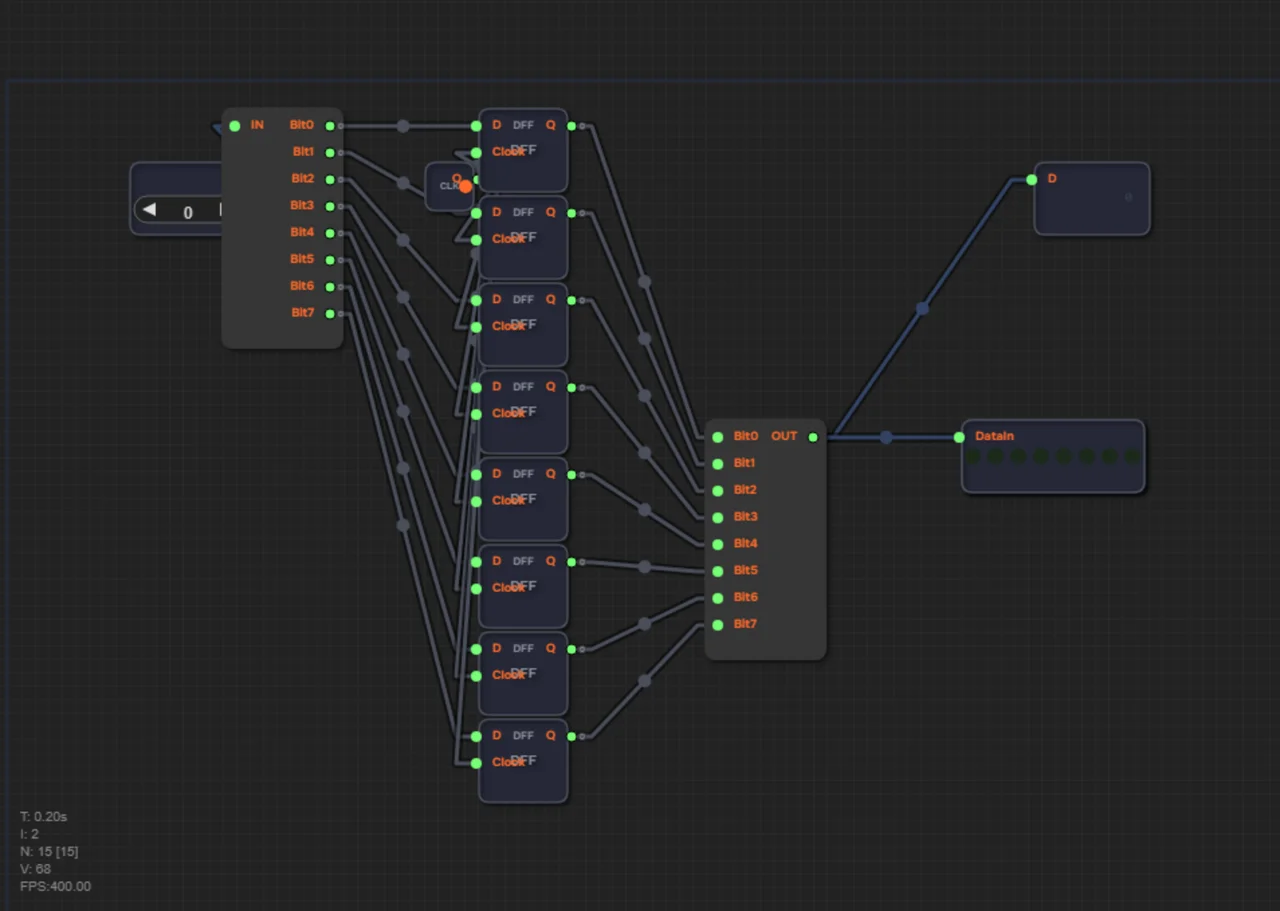
How do you build memory for a whole byte? Easy! Take eight D flip-flops and line them up. Then connect all of their Clock inputs with one shared wire. Now, on a single "tick", all eight flip-flops open their doors at the same time and remember the 8-bit combination of zeros and ones arriving on the data bus.
Such a bundle is called a register. Registers are the ultra-fast "pockets" of the processor. If RAM is a huge warehouse you have to walk to for every piece of data, registers lie right at hand, next to the ALU. The processor keeps in them the numbers it is doing math with right now.
Eight flip-flops in a row
Register8 is eight independent DFFs with a shared clock input. Each flip-flop stores its own bit, and all together they store a whole byte. We talked about each such flip-flop in the article on the clock and the D flip-flop: remember, a DFF captures its input value only on the Clock edge.
In the game the register is assembled from three blocks: a Splitter breaks the input bus into 8 separate bits, eight DFFs store those bits, and a Maker assembles them back into an 8-bit bus. The output goes to an LED8 — the LEDs show what the register has stored: a lit LED is 1, an unlit one is 0.
Parallelism: all bits are written at once
The key word is simultaneously. If you connect all eight Clock inputs with a shared wire, the clock edge reaches every DFF at practically the same moment, and all eight bits are written in a single tick. That's exactly how registers work in a real processor: one event — the edge — updates all cells at once.
The number of bits in a register is its "width". Eight flip-flops make an 8-bit register, sixteen make a 16-bit one. The width defines which numbers fit: 8 bits hold values from 0 to 255.
How to write a number into a register
Writing happens on the Clock edge. Before the edge, the desired value must sit on the data bus — that's exactly what ends up in the flip-flops. After the edge you can change the input as much as you like: the register keeps the old value until the next edge.
| Moment | Data (bus) | Clock | Q (output) |
|---|---|---|---|
| Before the edge | 42 (00101010) | 0 | old value |
| Edge | 42 (00101010) | 0→1 | 42 (00101010) |
| After the edge | any | 0 | 42 (00101010) — held |
The ready Register chip you get as a reward for the level also has a WE (Write Enable) input: writing is allowed only when WE=1. This is the register's "door" — while it's closed, no data gets in.
A numeric example: storing 42
Let's go step by step through how the number 42 gets into a register. In binary, 42 = 00101010, which is 32 + 8 + 2.
1. Put the value 42 on the Data bus: the bits become 0 0 1 0 1 0 1 0.
2. The Splitter breaks the bus apart: the first DFF gets the least significant bit 0, the second gets 0, the third gets 1, and so on up to the most significant bit 0.
3. Apply a Clock edge — all eight flip-flops capture their bits simultaneously.
4. Check the output: the Maker reassembles the bits — on the bus we see 00101010 again, which is 42.
5. Change Data afterwards — the register still outputs 42 until the next edge.
Writing and reading 42 go through the same bus — only the direction differs. This property will matter when we connect memory and processor: read the article on Harvard architecture.
Why registers are so fast
Practical example. The register is the fastest memory in a computer. Access takes about 0.3 nanoseconds. For comparison: reading from RAM takes 10 nanoseconds, and reading from a hard drive takes 10 milliseconds (30 million times slower!). That's why the processor keeps current data in registers instead of shuttling it back and forth from RAM. x86 processors have only 16 general-purpose registers — and programmers fight a real battle over them when optimizing.
Registers live right in the processor core, next to the ALU: no need to drive signals over external buses, data travels along short internal wires.
Common mistakes
- Feeding the DFFs different clock signals — the bits are then written at different times, and the output becomes a "stew" of stale values.
- Forgetting the Splitter or the Maker: without them, the bus and the individual DFFs simply won't connect.
- Changing data at the same moment as the edge — the flip-flop must see a stable value on its input at the 0→1 transition.
Summary
1. A register is several D flip-flops with a shared clock input; eight flip-flops form an 8-bit register.
2. All bits are written simultaneously on a single Clock edge — parallelism in action.
3. In the game a register is built from Splitter + 8×DFF + Maker, and the output is shown on an LED8.
4. Writing and reading share one bus; the ready Register chip adds a WE input — write enable.
5. Registers are the fastest memory: about 0.3 ns vs 10 ns for RAM and 10 ms for a disk.
6. A few registers and a shared data bus are the first step toward a real processor (Harvard architecture).
In level 1.12 you will build an 8-bit register: a Splitter breaks the bus into 8 bits, eight D flip-flops capture them on a shared Clock edge, and a Maker reassembles the bits into a byte. Connect the output to an LED8 — and you'll see your first "tangible" memory.