Project Pitch
Ershov Computer is an engineering course where a class builds a real computer from scratch: from a single wire to a processor on an FPGA board
The Problem
School computer science teaches programming inside a finished computer. A student writes code while treating the machine as a "black box", and by graduation has no picture of what happens between a line of code and a blinking LED. This gap surfaces later: in engineering universities, at olympiads, in interviews for hardware teams.
Our Solution
Ershov Computer flips the order: the course teaches students to build the computer itself. The key figures of the course:
47 levels in 4 parts. Level 1 is connecting a wire. The finale is a processor written in Verilog, exported to a real Tang Nano 9K FPGA board. In between: logic gates, adders, memory, clocking, Harvard architecture, an assembler with 15 instructions, and a Snake game the student programs on their own processor.
About 21 hours of pure problem-solving — the total across the typical completion time measured for every level. That is one school year at two lessons a week, or a five-day intensive.
Runs in the browser, no installation — a computer and internet access are all it takes. The entire course is bilingual: Russian and English.
How It Works
1. Design. Students assemble circuits in a graphical editor, then describe them in Verilog — the language the industry uses to design real chips.
2. Bring-Up. Every circuit is verified by the simulator: truth tables, checkpoints, waveforms. Completed circuits become chips used to build the next level.
3. Optimization and Debugging. Students freeze time with the STEP button, read oscillograms, and hunt down a faulty gate in the circuit hierarchy with the RTL Viewer.
The finale is materialization. The course ends with a ZIP project for a real FPGA board: the student's processor is flashed into the Tang Nano 9K chip and blinks the LEDs of the Ershov Board lab station.
Educational Mechanics
Behind every number stands a developed methodology — all its mechanics are covered on the Course Methodology page. Here are the core ones.
The Bottom-Up Abstraction Ladder
The course retells the whole history of computing in one semester: wire → NAND gate → logic → arithmetic → memory → clocking → processor → assembler → Verilog. A completed circuit becomes a chip, and the student's own schematic is preserved inside it: the half adder built at level 6 runs inside the 8-bit adder at level 8. Abstraction stops being a textbook word once you have built it yourself.
"Basics" Primers
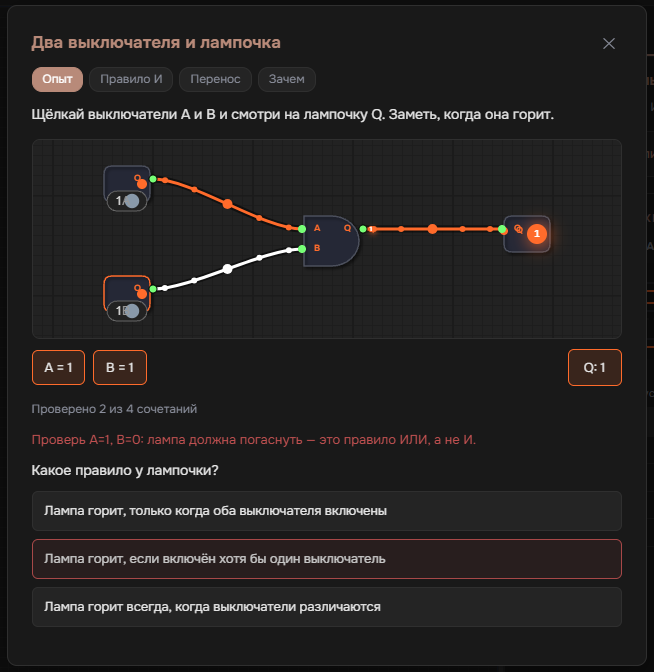
Before 11 key levels, students get an interactive primer: first an experience with a metaphor (assemble the number 5 from weighted lamps, press the write button on a flip-flop), then a prediction of "what happens if…", and only then the formal term. The term is introduced after the phenomenon, following the learning cycle of experience → prediction → observation → explanation → transfer.
Concept Checks — 28 Micro-Tests
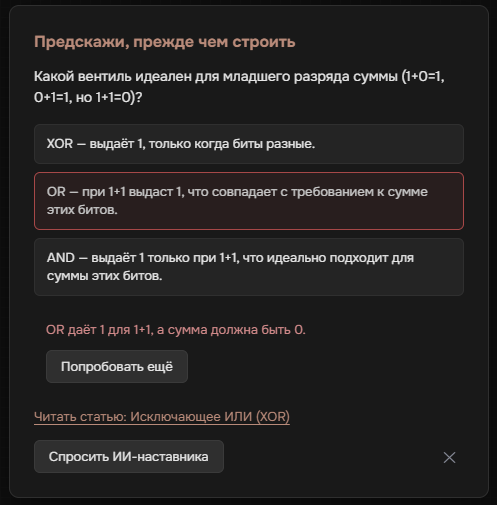
What gets tested is not the fact of assembly but understanding of the principle. A micro-test appears before assembly (predict the result) or after success (explain why the circuit works). Three levels feature "crash tests": the task is to break the circuit in a specified way, which requires understanding how the element works. A wrong answer never blocks progress: the modal shows an explanation of the misconception and a "Try again" button, and every distractor comes with an explanation of the typical mistake.
The Hint Ladder and Support System
The hint button works in two clicks: first a guiding question, then the solution. The second stage is not freely available: it opens through a gate once the student opens the level guide, spends 10 minutes on the task, or racks up 7 failed checks. On six fundamental levels the second stage inserts a faded scaffold instead of a full solution: a circuit with 1–3 wires removed for the student to close themselves. Such a solution costs half the reward, and the penalty is fully refunded on an independent retake. Teachers can disable auto-assembly for the whole class in the teacher dashboard.
AI Tutor and Proactive Help at "Walls"
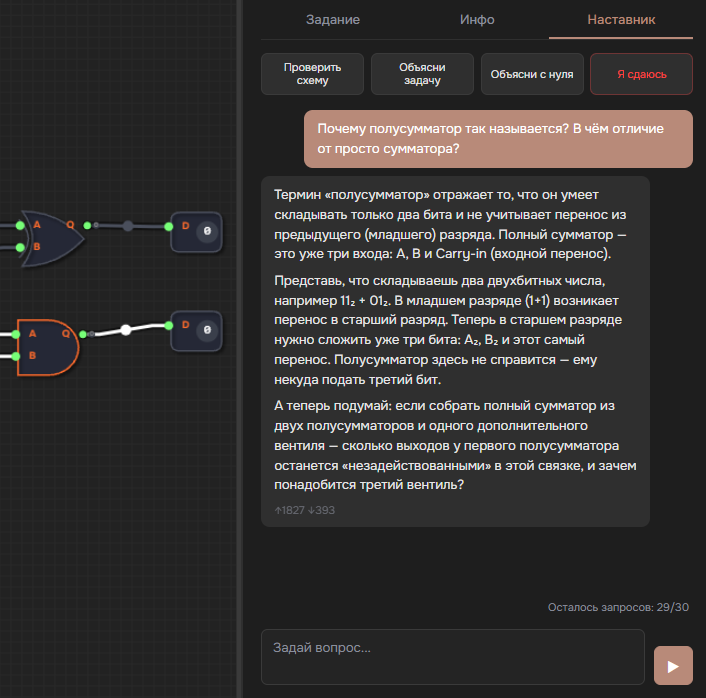
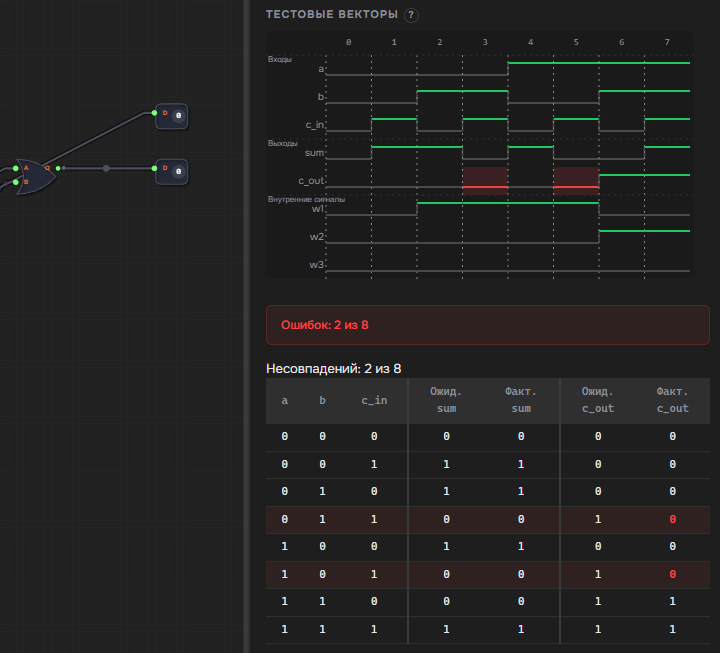
The AI tutor sees the student's current circuit and the level context. By default it works Socratically: instead of handing over a solution, it asks guiding questions. When a student gets stuck, help arrives on its own: after 3 failed checks in a row a banner appears with a local diagnosis of the error (the system distinguishes 7 failure classes, down to the names of failed test vectors), and after 7 it offers to walk through the solution. The help stays unobtrusive: the banner closes with a "Later" button and no consequences.
"Stopping Time" and Engineering Debugging
A regular processor runs millions of clock cycles per second, and its processes are invisible. In this course students have a superpower: manual clocking with the STEP button freezes time and lets them watch every single cycle. The Verilog part adds waveform diagrams, an RTL Viewer with double-click drill-down into submodules, and a level where the bug is found on an oscillogram, as on a real test bench.
The "Transistor Run" Game
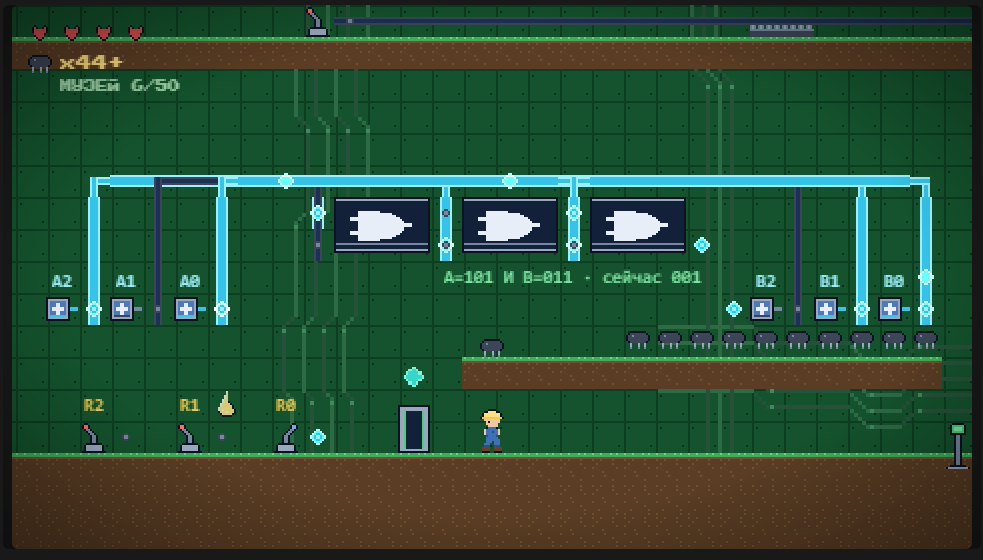
Alongside the course runs a 33-level platformer where the world is built like a circuit: the hero runs across the map, flips switches, and presses STEP at the clock button, while the level's circuit is computed by the actual simulator engine. A door opens only for a correctly assembled circuit. Each level ends with a transfer quiz based on the course's learning outcome. In bonus rooms, bitwise operation examples are regenerated on every visit, so the answer can only be computed. There is also a museum of 50 plaques about real computing hardware and a perk economy.
Game Economy and Engineer Profile
Levels award transistors: difficulty multiplied by 50, with hints and auto-assembly reducing the reward and an independent retake refunding it in full. Each student has an engineer profile with statistics: completion time, levels solved without hints, "walls", and ranks from Fitter to Architect at 40 completed levels. A negative balance never blocks play: motivation is supported, but progress is never gated.
Engineer Certificates
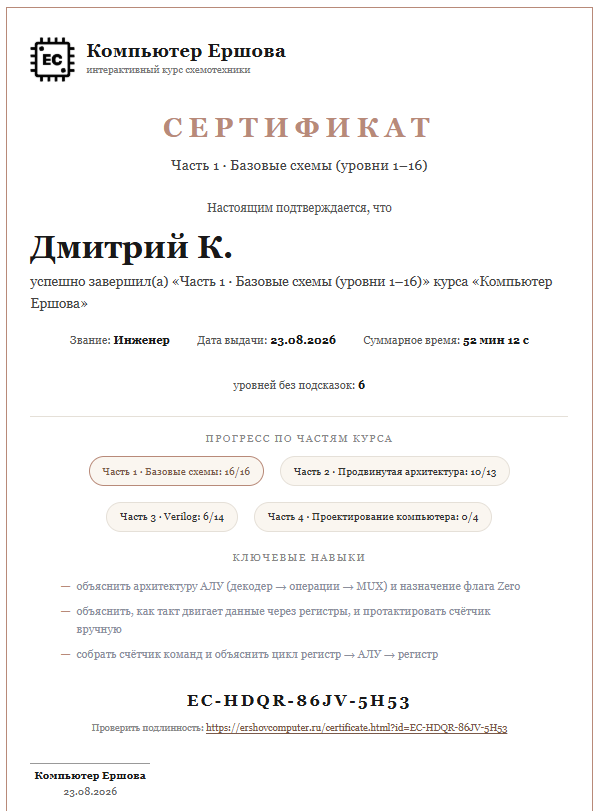
Completing each part of the course earns a named certificate with server-side verification. The server cross-checks completion against telemetry logs and issues a document with a unique EC-XXXX-XXXX-XXXX number and a public verification page. The certificate can be printed, added to a portfolio, and shown as a link whose authenticity verifies in a minute.
Ready for Classroom Adoption
The course ships with materials for teachers: a curriculum page with a timeline of all 47 levels and a school-year plan, 11 method cards with ready-made 45-minute lesson plans, a teacher dashboard with class analytics, a placement diagnostic, a built-in assembler, a sandbox for free experimentation, and a library of over 100 materials: a guide for every level, component datasheets, and circuitry articles.
What Students Will Learn
| Area | What the student masters |
|---|---|
| Boolean algebra | Truth tables, De Morgan's laws, functional completeness of NAND |
| Binary arithmetic | Bit-level addition, carries, two's complement, overflow |
| Sequential logic | Latches, flip-flops, registers, counters, clock edges |
| Computer architecture | Harvard architecture, buses, control unit, memory-mapped I/O |
| Programming | Assembler: variables, branches, loops, state in RAM |
| Verilog and debugging | Structural hardware description, oscillograms, drill-down through the circuit hierarchy |
Value for the School
Prestige and Uniqueness. This is a course at the level of strong technical lyceums affiliated with universities. It visibly sets the school apart from standard robotics clubs.
Career Guidance. The course shapes T-shaped engineers who understand both hardware and software. The final project, a working processor on a real board, stays with the student as a portfolio piece.
Measurability. Every student's progress is visible in the teacher dashboard: completed levels, "walls", micro-test results, completion time. The school gets data instead of "the kids liked it".
Product Quality. The course is covered by 645 automated tests and ships in two languages. The project bears the name of Academician Andrey Ershov, continuing the Russian school of programming and engineering.