Level 24: Manual Pixel
Open the level →Where it fits in the machine →
Task
Goal: Before programming the display (level 27), look at its ports in hardware: connect 4 BusConstants to the MatrixDisplay and light up the pixel at (0,0).
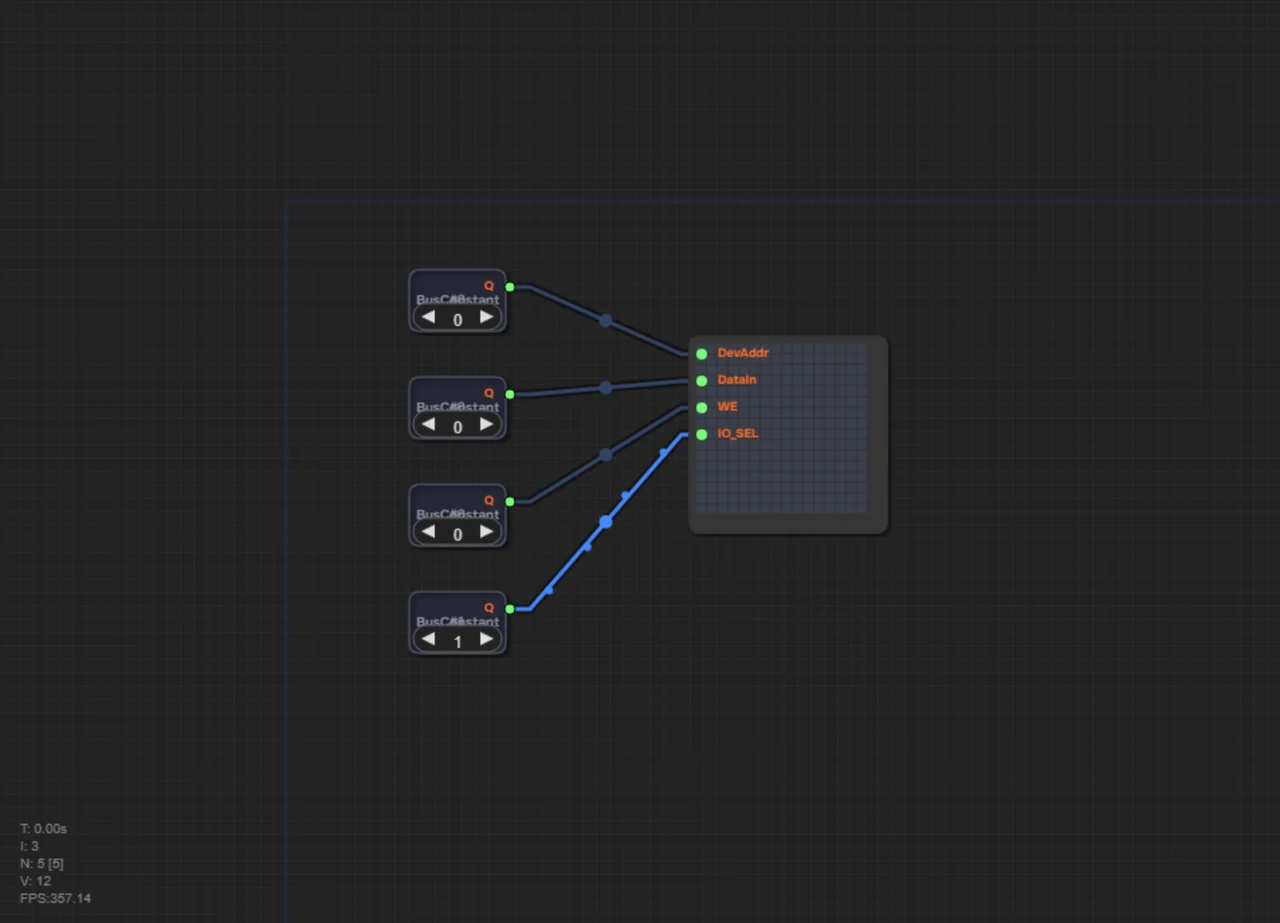
MatrixDisplay — 16×16 matrix display. It has 4 inputs: - DevAddr (port 0): port number (0x1C = set X, 0x1D = set Y, 0x1F = write pixel) - DataIn (port 1): value (for X/Y — coordinate 0–15, for write — 1=light, 0=clear) - WE (port 2): write enable (1 = write) - IO_SEL (port 3): device select (1 = display active)
The main idea: the display is not magic but a protocol: three writes in a row (X, then Y, then the pixel) turn ordinary memory writes into drawing on screen. Knowing the ports is enough for a program to draw.
Related Materials
- MatrixDisplay: matrix display
- AddrDecoder: address decoder
Solution for self-check
Try building the circuit yourself first. The solution below is a way to check yourself if you're stuck or have already solved it.
What you should get: the pixel in the top-left corner (0,0) is lit.
Here the display is driven not by memory addresses but by four separate buses: DevAddr selects the operation, DataIn carries the value, WE enables the write, IO_SEL activates the device. This differs from levels 28–29, where the screen hides behind MMIO addresses (252/253/255) and the CPU talks to it as if it were memory.
Initially X=0, Y=0. To light pixel at (0,0):
1. Set first BusConstant (DevAddr) to 0x1F (31) — write pixel mode. 2. Set second BusConstant (DataIn) to 1 — light up. 3. Set third BusConstant (WE) to 1 — enable write. 4. Fourth BusConstant (IO_SEL) is already 1 — keep it.
5. Connect wires: - BusConstant#1 (Q) → MatrixDisplay (DevAddr, port 0) - BusConstant#2 (Q) → MatrixDisplay (DataIn, port 1) - BusConstant#3 (Q) → MatrixDisplay (WE, port 2) - BusConstant#4 (Q) → MatrixDisplay (IO_SEL, port 3)
Run the checkpoint — the top-left pixel should light up!
Check yourself
How do the display ports here differ from levels 28–29?
Here there are 4 separate inputs (DevAddr/DataIn/WE/IO_SEL); on levels 28–29 the display hides behind the MMIO addresses 252/253/255.